The Disability Report provides the basic information of students identified as having disabilities based on medical reports. This is highly confidential information and can only be accessed by authorized users. We strongly advise all authorized users to maintain the confidentiality of this information and refrain from sharing it under any circumstances.
Process to View Disability Report
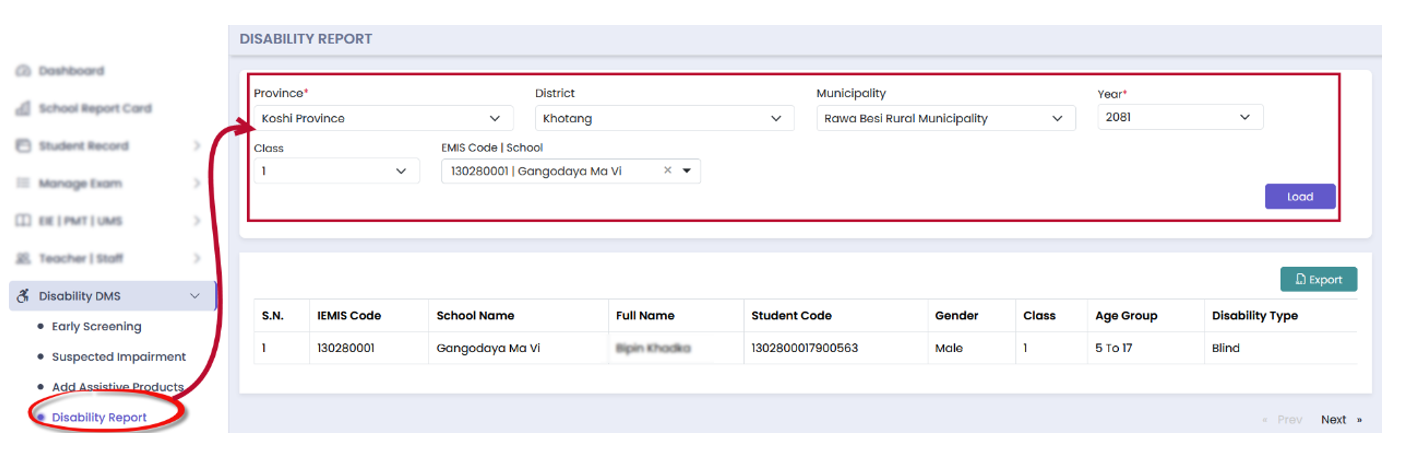
Follow these steps to view the Disability Report:
- Click on Disability DMS
- Click on Disability Report in the menu
- Apply the filtering criteria (province, district, municipality, etc.)
- Click the Load button to display the records.
Quiz
Test your knowledge about the process to view reports.
Click on Disability DMS
Apply filtering criteria
Click on Load button
Report is generated
Filters are reset
Data is saved